
FacebookX
URExpat
URExpat

Trusted information for expatriates living and working in Saudi Arabia.

Company

  • About
  • Contact

Categories

  • Visas & Immigration
  • Iqama & Residency
  • Work & Employment
  • Family & Dependents
  • Driving & Transportation

Resources

  • All Articles
  • Saudi Tools
  • Emergency Numbers
  • Useful Apps

Legal

  • Privacy Policy
  • Terms of Use
  • Disclaimer

© 2026 URExpat. All rights reserved.

Privacy·Terms

HomeArticlesIqama & ResidencyHow to Activate an Absher Account via Nafath
Iqama & ResidencyUpdated2 min read

How to Activate an Absher Account via Nafath

Learn how to activate your Absher digital identity through the Nafath app using your Absher login, verification code, and biometrics.

Devnex Logo

Devnex

Verified Team

Published August 16, 2026
Nafath Activation Image

Table of Contents

How to Activate an Absher Account via NafathWhat You NeedHow to Activate Absher Through Nafath1. Open Nafath2. Open Digital Identity Account Management3. Enter Your Absher Details4. Complete Verification5. Complete Biometric Verification6. Activation CompleteImportant

How to Activate an Absher Account via Nafath

You can activate your Absher digital identity through the Nafath app. If you already have Nafath installed, open the app and follow the activation steps below.

What You Need

  • An Absher account
  • Your Iqama or ID number
  • Your Absher password
  • A mobile phone with the Nafath app
  • Access to the mobile number registered with Absher

How to Activate Absher Through Nafath

1. Open Nafath

If you already have the Nafath app, open it on your phone.

If you do not have Nafath, download it from the Apple App Store if you use an iPhone or the Google Play Store if you use an Android phone.

2. Open Digital Identity Account Management

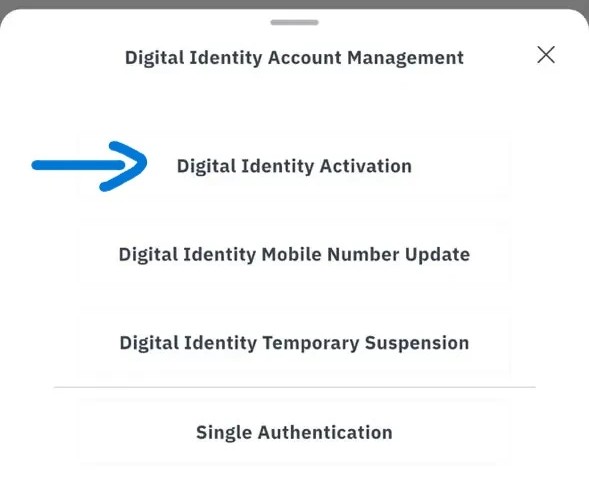
After opening Nafath, go to Digital Identity Account Management.

Select Digital Identity Activation.
Absher Portal Screen Shot

3. Enter Your Absher Details

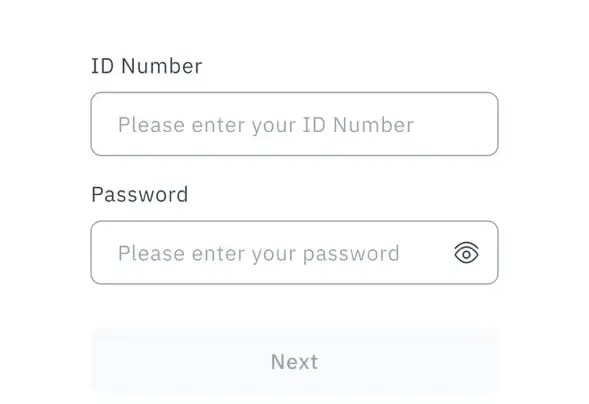
On the Digital Identity Activation page, enter your:

  • ID Number
  • Absher password

Then select Next.

Absher app Screen Shot

4. Complete Verification

Follow the instructions displayed in the Nafath app to verify your identity.

You may be asked to complete additional verification using the information and verification methods shown in the app.

5. Complete Biometric Verification

Follow the on-screen instructions to complete the required biometric verification.

Make sure your face is correctly positioned as instructed by the app.

6. Activation Complete

Once the verification is successfully completed, your Absher digital identity will be activated through Nafath.

Important

Make sure your Absher account is already registered and that you have access to the mobile number associated with your account. Follow the instructions shown in the Nafath app during the activation process.

Official Source Links

Absher — Activate Digital Identity Through NafathAbsher — Registration & Activation

Share this article

Help others find this useful information.

Table of Contents

How to Activate an Absher Account via NafathWhat You NeedHow to Activate Absher Through Nafath1. Open Nafath2. Open Digital Identity Account Management3. Enter Your Absher Details4. Complete Verification5. Complete Biometric Verification6. Activation CompleteImportant

Related Articles

How to Create an Absher Account in Saudi Arabia

2 min read